





A laptop, tablet or phone with a camera
A bigger screen helps your child see the tutor. A second phone propped against a glass makes a handy book camera.
Your child learns to read, write and count from home with a tutor who sees the book and their hand directly. The class link and worksheets arrive through the Lilo app before each session, and the weekly report lives in the same app.
Lilo online lessons are one-to-one video sessions in reading, writing and counting for children aged 4 to 8. The tutor sees the book and your child's hand through the camera, corrects sounds and strokes on the spot, and uses Lilo worksheets sent before class. Lessons start from IDR 76,865 per session.
Online lessons in reading, writing and counting take place over a video call. At Lilo one tutor stays with one child for 60 minutes, using the same 122-module curriculum as home lessons, while your child works on real printed sheets at their own table.
Each session is built from short, changing activities, because young children focus best when their bodies and hands are involved.
The tutor greets your child by name, sings or plays a quick sound game, and asks what they did yesterday. Warmth first, then learning.
The phone or laptop points at the book and your child's hand. Now the tutor can see the pencil grip, the stroke direction and the finger pointing at each letter.
Your child counts buttons or sticks on the table, voices sound cards and blends syllables. The tutor corrects sounds and strokes right away.
Your child stands up, jumps while counting, or writes giant letters in the air. The short break brings focus back before the next part.
Your child works on the printed sheet, then holds it up to the camera. The tutor checks every answer and praises each correct step.
The tutor sums up what your child mastered today and sets a ten-minute activity for home. The notes go into the weekly report.
A session runs 60, 90 or 120 minutes. For young children we recommend 60 minutes, split into short activities that keep changing.
| Age | Recommended length | How the session is built | Support at home |
|---|---|---|---|
| Age 4Introduction Level | 60 minutes | Six to eight short activities: sound songs, cards, counting objects, strokes, a movement break, then a worksheet. | An adult sits near your child throughout, helping with the camera and the objects. |
| Age 5Foundation Level | 60 minutes | Five or six activities: syllables, letter writing, number bonds, a movement break, a worksheet and a wrap-up. | An adult stays in the same room, ready to adjust the camera or the sheets. |
| Ages 6-7Intermediate Level | 60 or 90 minutes | Longer blocks for reading words and sentences, writing from pictures, and adding up to 20. | Most children are independent by now. An adult prepares the sheets and checks in at the start. |
| Ages 7-8Advanced Level | 60 or 90 minutes | Reading short stories and answering questions, writing full sentences, place value and word problems. | Your child learns alone. You read the weekly report and join the small home task. |
Prices in the Fees section are for 60-minute sessions. 90 and 120 minute sessions are available and priced accordingly.
Everything is simple, and most of it is already in your home.
A bigger screen helps your child see the tutor. A second phone propped against a glass makes a handy book camera.
Home wifi or mobile data strong enough for a video call. The Lilo team sends the class link before each session.
A table at chest height, light from the front or side, and few toys nearby so attention stays on the book.
The Lilo team sends sheets from the current module before class. Print them at home or at a nearby print shop.
A pencil, crayons, an eraser and ten to twenty small objects such as buttons, lolly sticks or bottle caps.
These sheets come straight from Lilo's original modules. Reading, writing, and counting are trained side by side, step by step at your child's level.
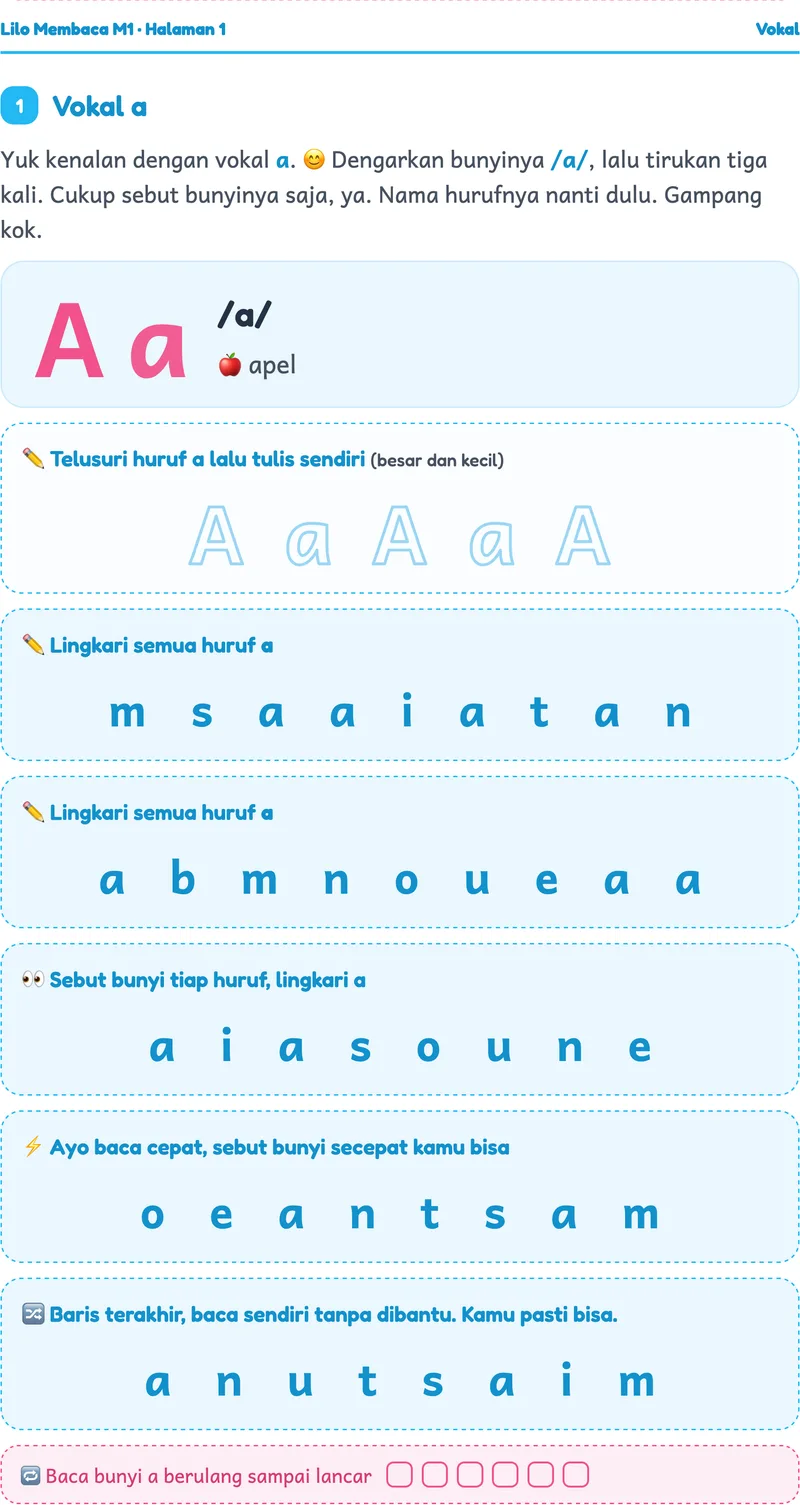
A real reading-module page: your child sounds out the vowel a with cards and point-and-read practice, the first door into reading.
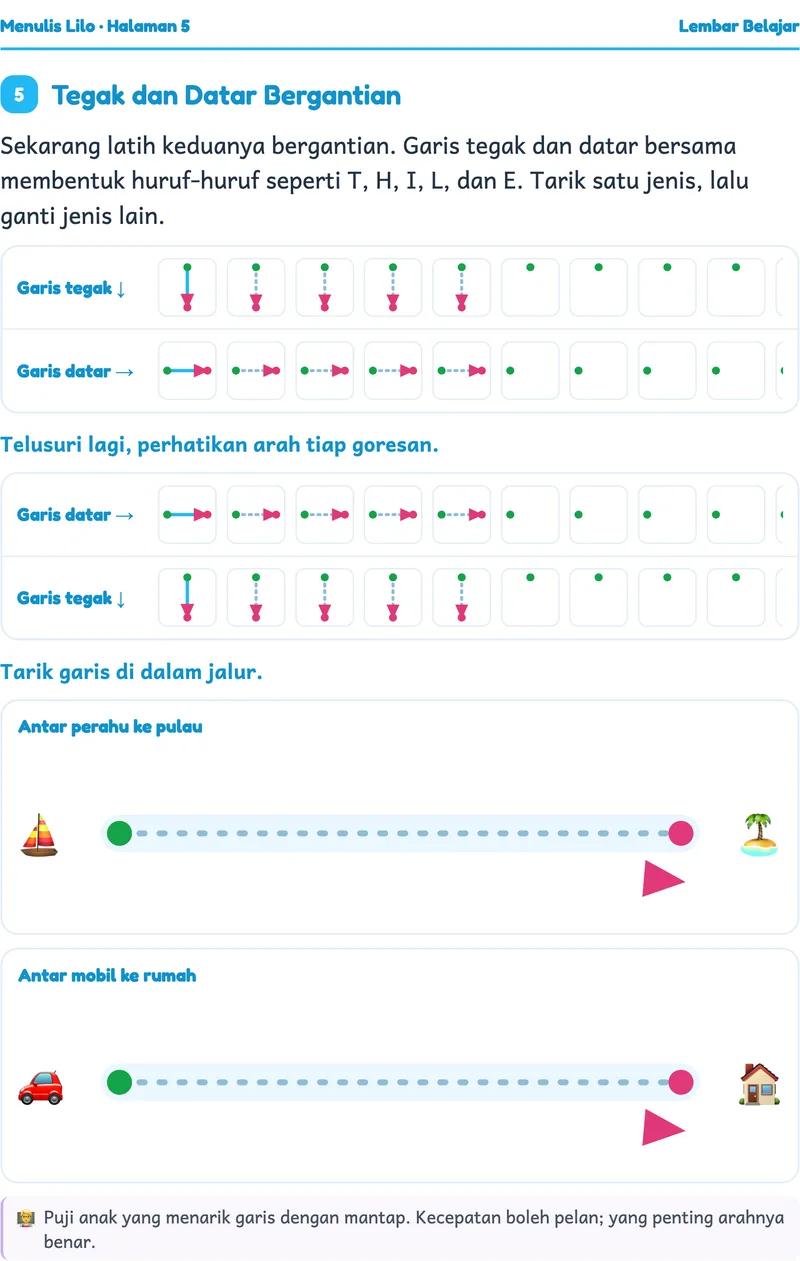
A real writing-module page: alternating straight and flat strokes train small hand muscles before the first letters.
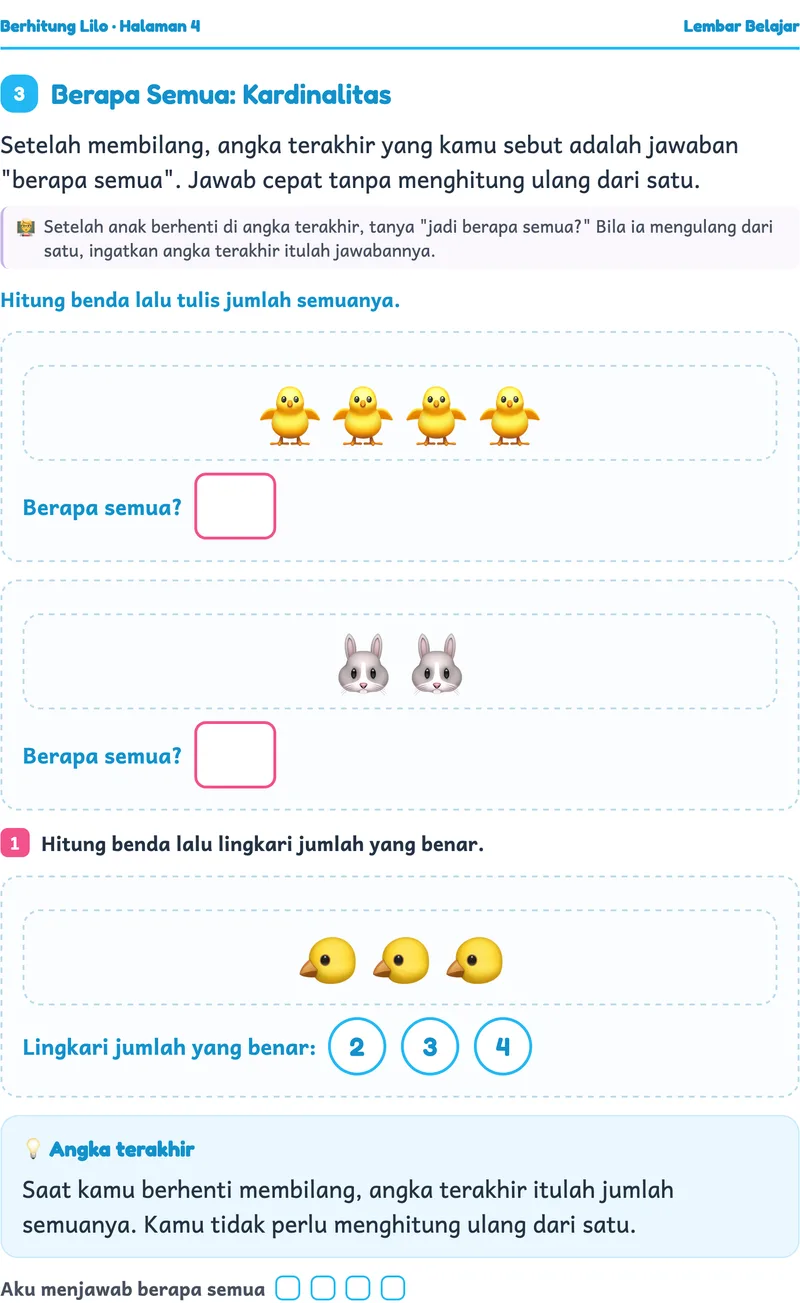
A real counting-module page: your child counts real objects one by one and names the total, a solid, concrete feel for numbers from the very start.
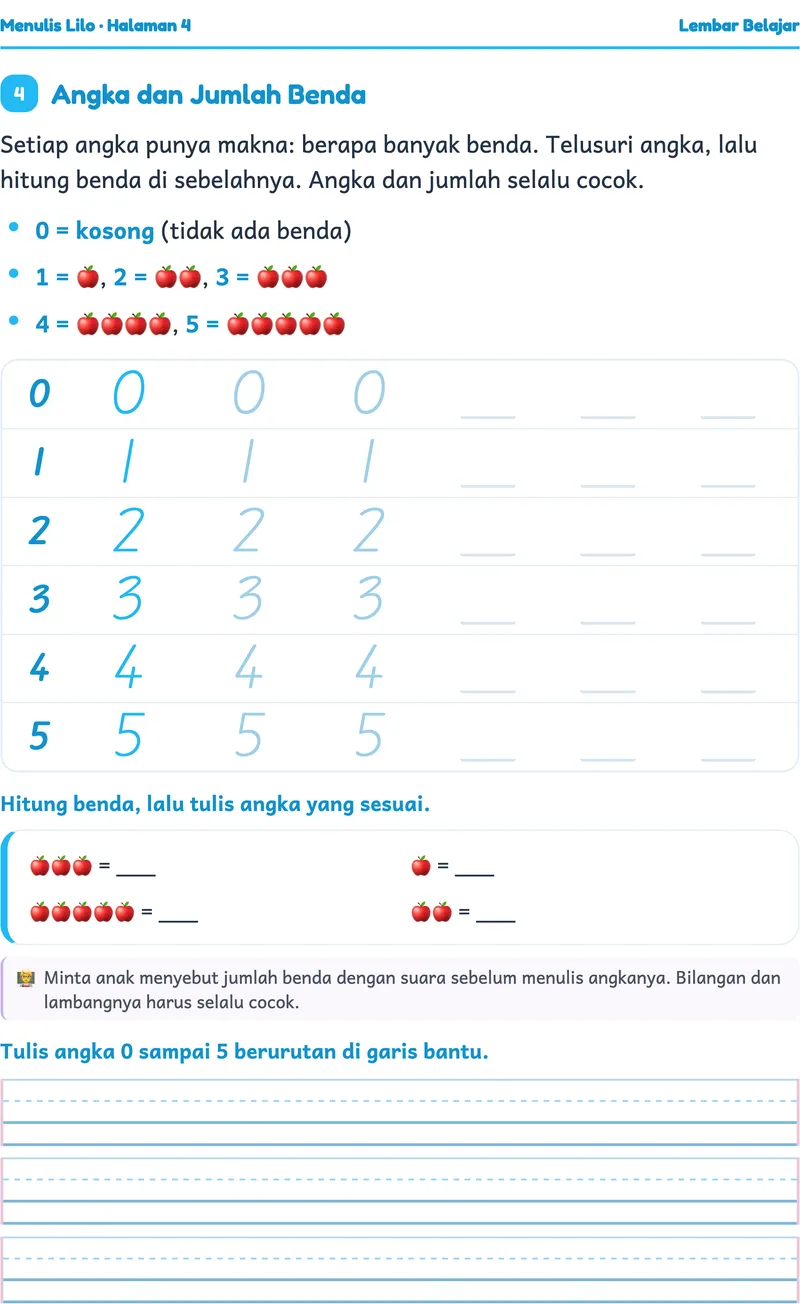
A real writing-module page: your child matches numbers to quantities and writes them neatly along guided paths.
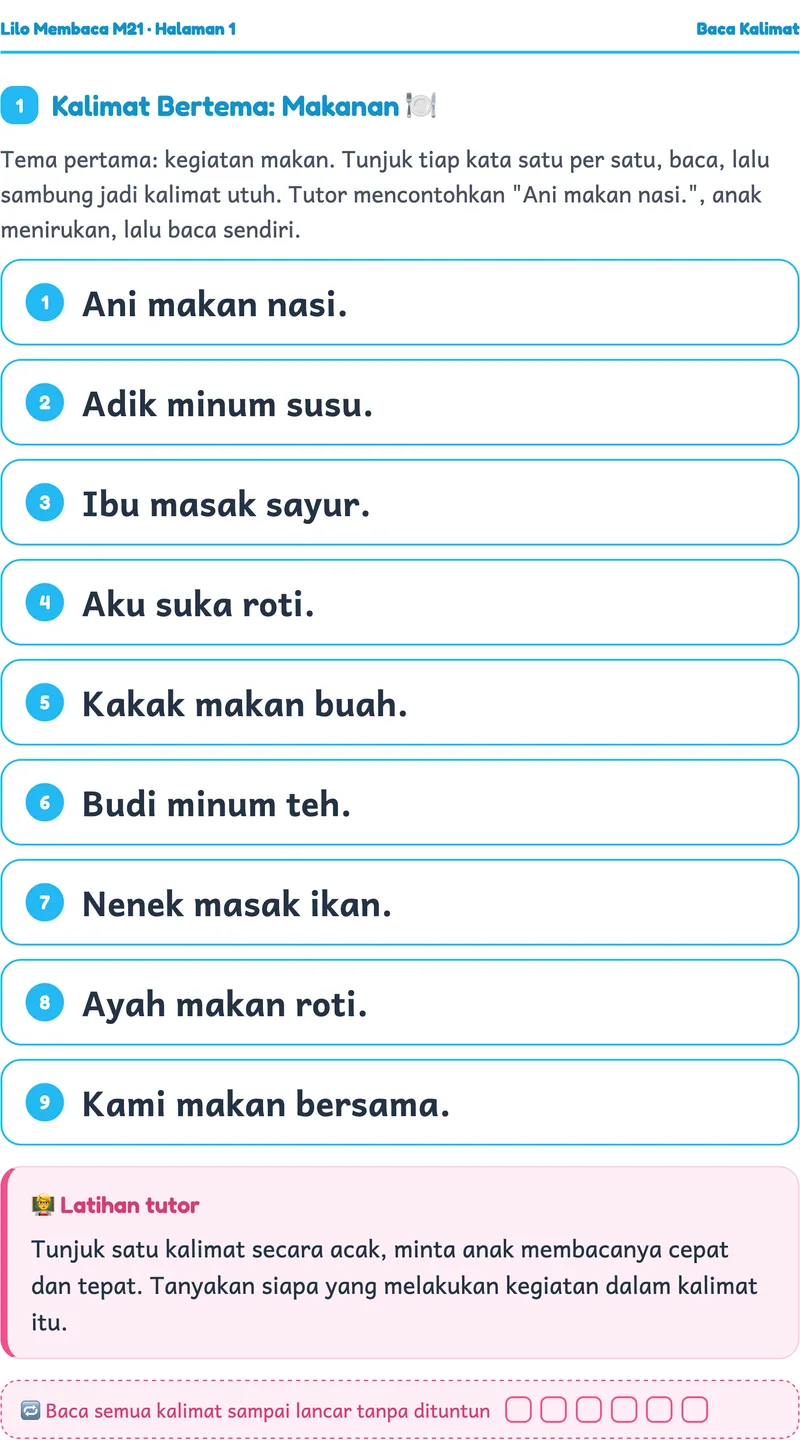
A real reading-module page: short food-themed sentences read in full, combining everything from letter sounds to syllables.
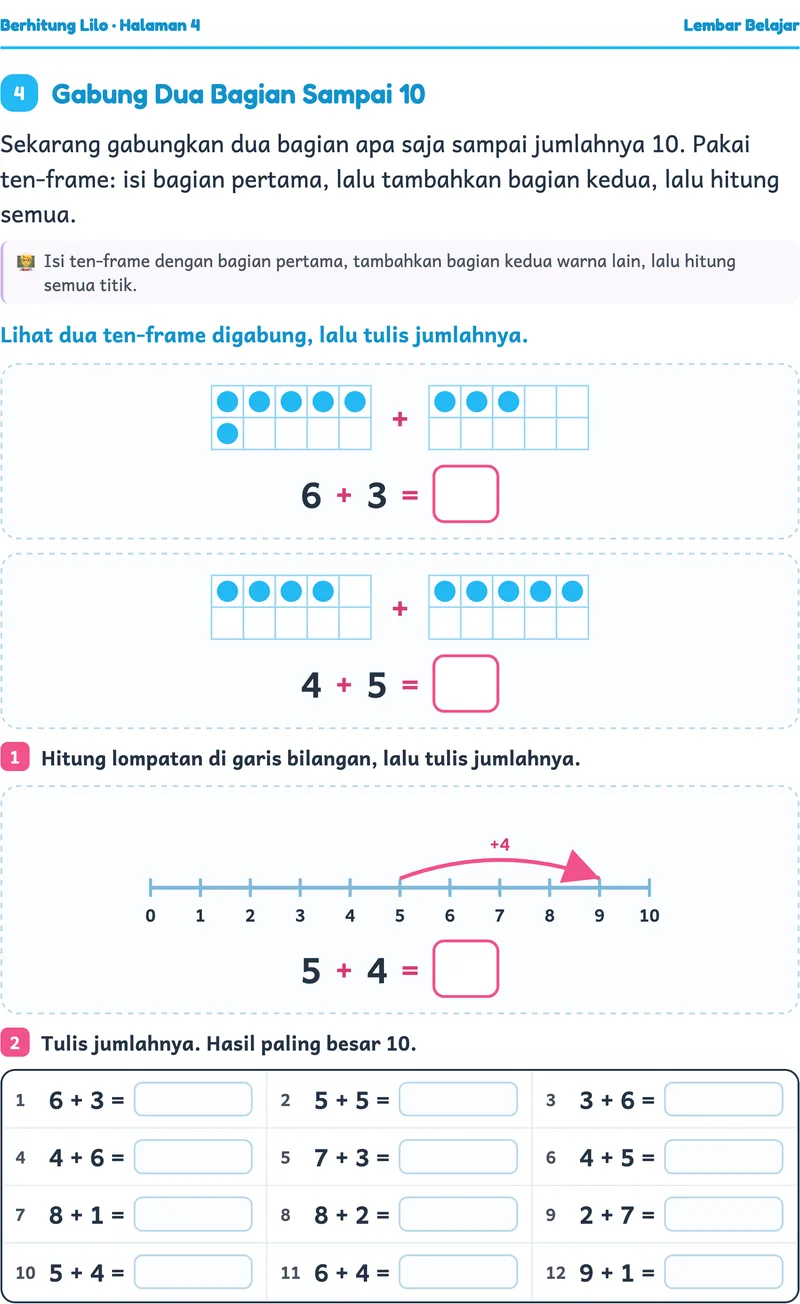
A real counting-module page: addition through ten-frames and a number line, seeing first and then counting, the concrete Lilo way.
Snippets from Lilo's own 122 leveled modules, from first letters and numbers to being ready for primary school.
The tutor leads the session. Your part is light, and it makes a big difference.
Print the sheets, set out the pencil and counting objects, and make sure your child has eaten and been to the toilet.
Help point the camera at the book and check the tutor's voice is clear. Then let your child and the tutor get to know each other.
Stay near your child, especially at ages 4 and 5. Let your child answer on their own, because small mistakes are exactly what the tutor needs to see.
Do the ten-minute task together, read the weekly report, and tell the tutor what you notice at home.
Older children often learn on their own from the second month. You still receive the same report every week.
Verified tutors ready to teach online, trained in reading, writing, counting, and finger math for young children.
Gently covers the three basics a child needs before school begins through games and real objects.
Steadily runs sempoa practice that sharpens focus and memory with plenty of encouragement.
Attentively makes finger counting a habit that trains care and attention using materials children can hold.
Kindly teaches children to count on their fingers in clear, orderly steps in small, enjoyable steps.
Calmly keeps sempoa practice steady so focus and working memory grow through games and real objects.
Cheerfully builds reading up from single sounds to short stories with friendly, regular practice.
A session runs 60, 90, or 120 minutes. The prices above are for 60 minute sessions, and longer sessions are priced accordingly. Lessons happen at your home or online. Larger packages cost less per session.
Each session works out to IDR 76,865 for online or private in-home sessions. Payment is made per package.
From the very first session.
One WhatsApp message is enough. Valid for as long as the package runs.
How it works:
A full report follows each month.
Razka wrote his own name for the first time on his grandma's birthday card. I even kept the card. His counting is getting more confident too, we are so grateful.
Within a few weeks, my child started recognizing letters and numbers. The tutor always gives progress reports that are very helpful.
I love the personal approach they use. My child, who used to struggle to focus, can now learn with real enthusiasm.
Reading, writing and counting tutoring in Online really helped my child understand letters and numbers in a fun way. The tutor is very patient and creative in teaching.
Gracia was so proud when she finished reading a whole thin book and counted the pictures on every page. Her tutor always cheers her on, so she is never afraid of making mistakes.
Your child can start online lessons before they can read. What you are looking for are small habits at home: how they listen to a voice from a screen, use their hands, and stay at one table.
The most common worry about online lessons is a child drifting off in front of a screen. The answer lies in how each session is built, minute by minute, by a tutor watching your child's table.
For a young child, a screen usually means something to watch. They sit, see moving pictures, and their body goes still. Lilo online lessons turn that habit around from the first minute. The camera points at the book and your child's hand, so the screen becomes the tutor's window onto the table. What gets watched all session is your child: the finger pointing at a letter, the pencil moving, the buttons counted one by one. Your child soon feels that they are the one doing the work here, and that feeling is what keeps them there.
Children aged four to six use movement to gather their thoughts. That is why each session is split into short activities that keep changing, with movement breaks planned in: jumping while counting, writing giant letters in the air, fetching an object from a corner of the room. The tutor also reads signs of tiredness through the camera, such as yawning, wriggling, or eyes sliding away from the screen. As soon as those signs appear, the activity changes before your child's attention slips away.
On video, a quiet child is hard to read. The tutor needs to know whether your child is thinking, confused, or starting to daydream. So the tutor keeps inviting them to speak: naming letter sounds, counting out loud, explaining why they chose an answer. Your child's voice becomes the tutor's main guide. A mixed up sound is heard and corrected on the spot, and a child who is talking almost always stays alert. Over time your child learns that saying an answer aloud, wrong ones included, is a normal part of learning.
The most important part of these lessons happens on paper. Worksheets printed at home let your child write with a real pencil, pressing, erasing, and trying again. That kind of movement builds the finger muscles and grip they will use every day in primary school. The screen simply connects them to the tutor. When a sheet is finished, your child holds it up to the camera and the tutor checks every answer with them. That moment of showing their work gives a proud feeling that powers them into the next sheet.
Most of the preparation is done before the camera turns on. Here is the order, from your first WhatsApp message to the small task your child finishes after the first session.
You tell us on WhatsApp about your child's age, habits, and the devices you have at home. The Lilo team looks at practical things too, such as a second phone for a book camera and the time of day your child feels freshest. From that conversation the session length and first schedule are set.
The Lilo team matches your child with a tutor used to guiding young children over video. You can read the tutor's profile first, so you can tell your child who will be saying hello. A child who already knows the tutor's name arrives at class feeling calmer.
Before the scheduled time, the class link and worksheets from the opening module land in the Lilo app. You print them at home or at a print shop, then set out a pencil and a handful of counting objects. Your child's table is ready the night before.
In the first session your child plays, with no written test. The tutor invites them to guess sounds, count objects on the table, and draw lines on paper, while watching through the camera to see what your child already knows. That play decides your child's first module.
The session ends with a recap and one activity of about ten minutes for home. Sheets for the next lesson are then sent from the module your child is working on. Each session picks up where the last one left off, and your child feels the lessons have a clear path.
Progress in online lessons shows on two sides at once: your child's learning habits in front of the camera and their reading, writing and counting. Here is a common pattern.
Your child learns that the screen in front of them is where the tutor sees their book. They get used to a phone facing the table, answer the tutor's hello, and try holding sheets up to the camera. A nearby adult still helps a lot.
Your child now recognises the order of activities. They know when it is time to sing, when to count buttons, and when to stand for a movement break. Many children start showing their sheet to the camera unasked and voicing the letter sounds they know.
Strokes on paper become more controlled because the tutor corrects grip and line direction every session. Your child says answers out loud with confidence, even when unsure, so the tutor knows exactly which part needs help.
Your child sets out their own pencil and counting objects before class starts. They read syllables or count objects with little help. For older children, the adult can begin to step back and simply check in at the start of the session.
Sessions feel like an ordinary part of your child's week. The tutor raises the challenge along the modules, for example from syllables to short sentences, or from counting to small sums. Your child loves bringing a sheet full of answers up to the camera.
This picture shows a common pattern. Each child's pace follows their age, their starting point, and the number of sessions each week.
These short activities train two things online lessons need: reading, writing and counting themselves, and the habit of working at a table while talking to someone else.
Your child draws a picture or writes one letter, then holds it up to a phone camera until the whole sheet shows on screen. Let them check for themselves whether the paper is tilted, too close, or covered by a finger. This small habit helps the tutor read their work easily in class.
A phone with a camera, paper, crayons
From another room, call your child and say one letter sound, such as m. Your child hunts for something at home whose name starts with that sound, then names it over the phone. The game trains careful listening to a voice coming from a device, just like listening to the tutor.
Two phones
The day before a session, your child arranges their class table: pencil, eraser, crayons, and ten small objects in one container. Let them count the objects as they drop each one in. A child who sets up their own table comes to class with a sense of ownership.
A small container, stationery, ten buttons or bottle caps
Sprinkle a thin layer of flour on a tray and invite your child to write this week's letter or number with a fingertip. Then they write the same shape on paper. The feel of flour under the finger helps the hand remember the stroke direction the tutor taught through the camera.
A tray, flour, paper, a pencil
Take the worksheet from the last session and ask your child to teach it to a doll or soft toy. They point at letters, voice the sounds, and count the objects out loud. While explaining, your child goes over the material in their own words, and you can hear which parts they have understood.
Last session's worksheet, one toy
Online lessons for young children depend heavily on the details of how they are taught. These questions help you see those details before you decide.
Early reading, writing and counting happen largely in the hands: pencil grip, stroke direction, a finger pointing at letters. If the tutor only sees your child's face, an awkward grip can settle in for a long time. At Lilo, the camera points at the book and your child's hand from the start.
Tapping a screen and writing with a pencil train the hand in different ways. A child getting ready to write needs to feel pencil pressure and form letters on paper. Lilo worksheets are sent before class and printed at home.
Young children's attention shifts quickly, especially in front of a screen. A good session is made of short, changing activities with movement breaks in between. Lilo recommends 60 minute sessions for young children, split into several short activities.
A child who changes learning format one day needs a path of material that carries on, so progress stays easy to follow. Lilo online lessons use the same 122 module curriculum as home lessons.
Adults at home already juggle plenty, and lessons whose materials are scattered across many messages soon feel like a chore. At Lilo, the class link and worksheets are sent by the Lilo team, and everything is managed in the Lilo app.
On screen, the fit between child and tutor matters a great deal. A comfortable child talks and dares to try, which is exactly what the tutor needs. Lilo replaces the tutor free of charge, and one WhatsApp message is enough.

Tell us your child's age and what they can already do. The Lilo team matches a tutor, sends the first sheets and prepares an online session that fits your child's readiness. The consultation on WhatsApp is free.
We will help you pick an online schedule that suits your child.